
What is a forest?
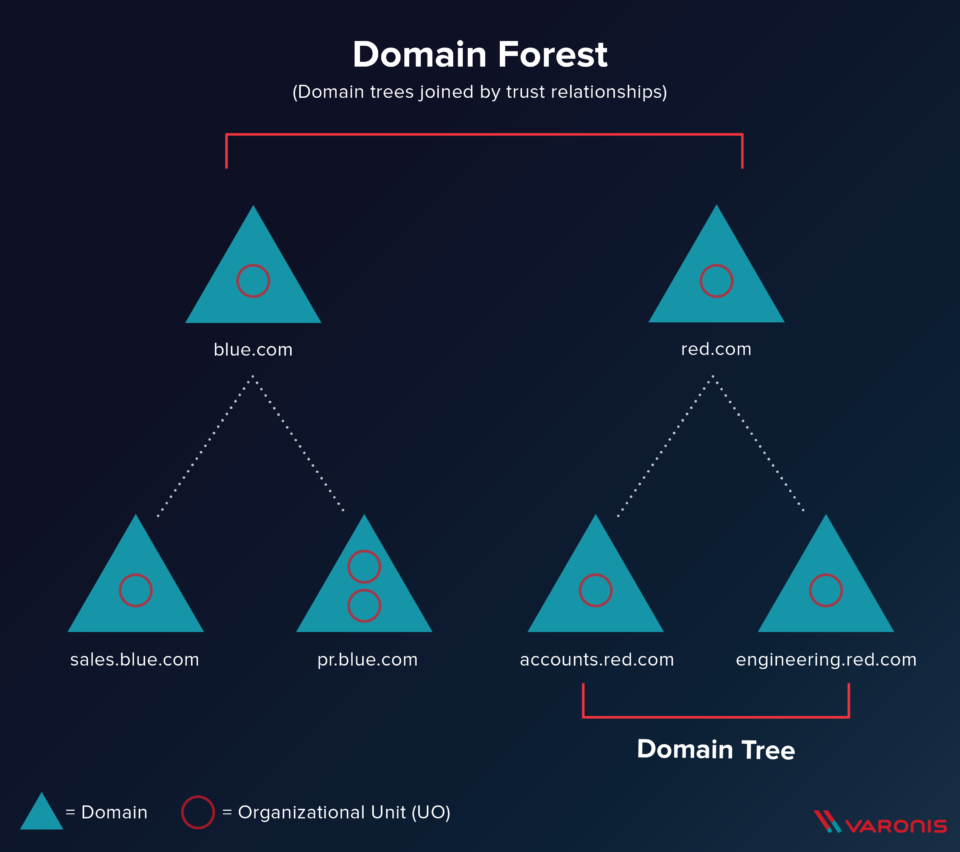
What is a Forest?
Top-level container and boundary for Active Directory
- An Active Directory forest (AD forest) is the top level container in AD that contains: domains, users, computers, and group policies.
- A single Active Directory configuration can contain more than one domain, and we call the tier above domain the AD forest. Under each domain, you can have several trees, and it can be tough to see the forest for the trees
- This additional top-level layer creates security challenges and increased potential for exploitation, but it can also mean greater isolation and autonomy when necessary
- A single AD configuration can contain multiple domains organized under the forest level
- Organizational Forest - Standard setup where users and resources are managed together
- Resource Forest - Separates user accounts from resources into different forests for critical system isolation
- Restricted Access Forest - Completely isolates users and resources with no trust relationships to other forests
- Single forest design is simpler and generally considered best practice
- Multiple forests multiply complexity and IT costs significantly
- Each additional forest should have its own dedicated IT team for proper segregation
- Trust relationships can be established between forests to allow controlled resource sharing
Best Practices:
- Fully understand Group Policy Objects (GPOs) and least privilege model
- Give domain admins separate admin accounts used only when required
- Ensure true isolation with no unnecessary connections
- One forest is usually enough
!!! REALLY GOOD GUIDE !!!
Summary and Takeaways:
Components of an Active Directory Forest
- Domains: The building blocks of a forest. Each domain in a forest can have its own organizational units, user accounts, and network resources.
- Trees: A grouping of one or more domains that share a contiguous namespace.
- Global Catalog: A distributed data repository that contains information about every object within the forest. It facilitates searching and locating resources across domains.
- Schema: Defines the types of objects and the attributes associated with them in the AD database. It ensures consistency across the forest.
Forest vs. Domain (Website definition)
While a domain provides a security and administrative boundary for a group of networked objects (like users and computers), the forest encapsulates these domains. It extends the administrative scope and sets overarching security policies. Understanding this hierarchy is crucial for effective AD management.
In essence, an Active Directory Forest is the cornerstone of a well-structured AD environment. It enables organizations to manage large and diverse networks efficiently, ensuring security and scalability.
Creating an Active Directory Forest using PowerShell
(from website noted above)
Needs:
- Windows Server with administrative privileges
- Planned domain name for the root domain
Install AD DS Role
Install Active Directory Domain Services with management tools: (relative powershell command)
Install-WindowsFeature AD-Domain-Services -IncludeManagementTools
Deployment Module
Import the required deployment module: (relative powershell command)
Import-Module ADDSDeployment
create new forest
Replace "yourdomain.com" with your chosen domain name: (relative powershell command)
Install-ADDSForest -DomainName "yourdomain.com"
verify by:
- Verify AD DS services are running
- Check Active Directory Users and Computers console for domain structure
- Validate global catalog and DNS functionality
Best Practices
- Regular Updates
- MFA
- Monitor
- Backup
- Cleanup